

Recensione di Sentry: pro, contro, funzionalità e prezzi


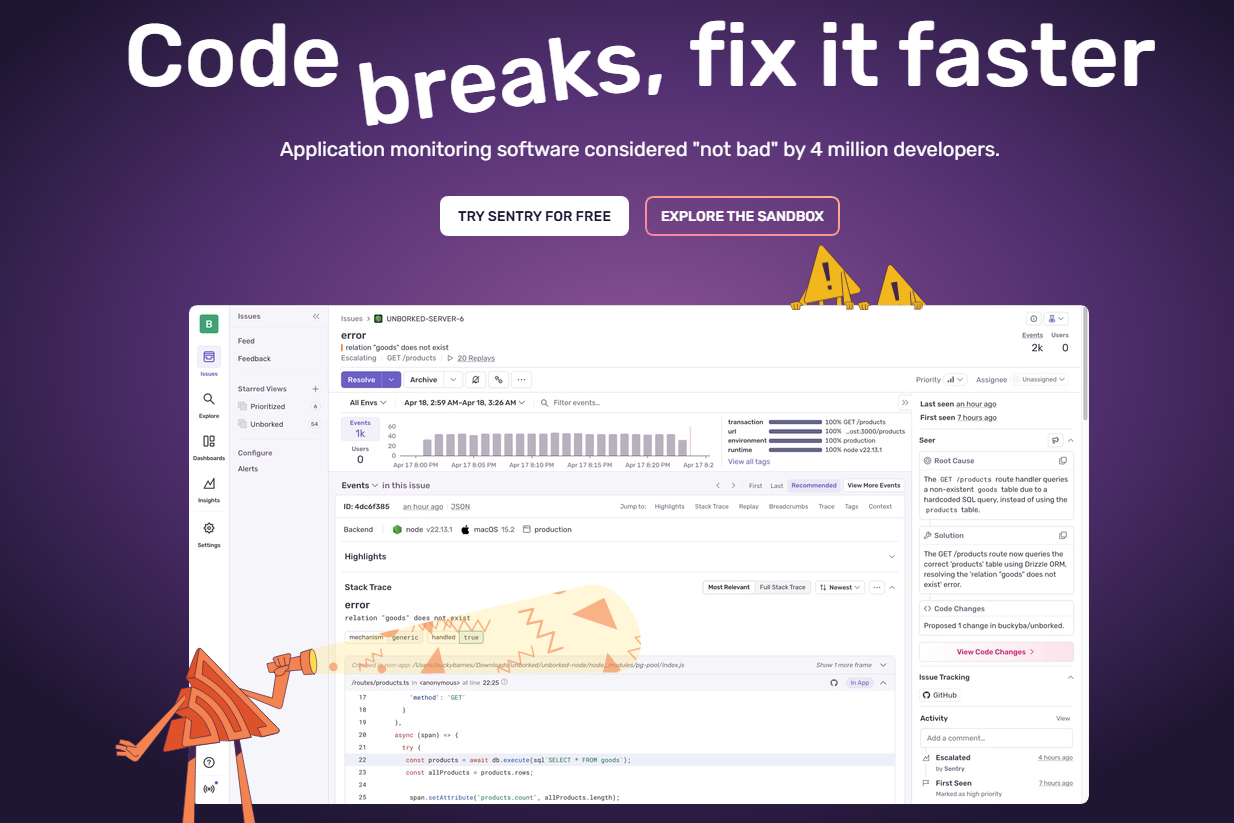
Sentry is a digital monitoring tool built around error tracking and application performance monitoring for engineering and development teams. It's worth considering if your team needs to catch and debug code errors in production, with visibility down to the exact line of code causing the issue. Compared to Datadog, Sentry is a more focused choice for teams whose primary need is code-level error tracking rather than broad infrastructure observability.
Sentry Evaluation Summary
- From $26/month (billed annually)
- Free plan + free demo + 14-day free trial available
Perché fidarsi dei nostri consigli sui software
Il nostro team testa e recensisce software dal 2012. In quanto leader CX noi stessi, sappiamo quanto sia difficile — e importante — scegliere il software giusto.
Per questa guida, abbiamo valutato gli strumenti attraverso test pratici e ricerche indipendenti, assegnando un punteggio agli strumenti in base ai nostri criteri di selezione.
Le nostre recensioni riflettono il nostro giudizio editoriale umano, non un discorso di vendita.
Sentry Overview
In my opinion, Sentry offers a solid platform for digital experience monitoring. It's packed with robust core features that cater well to large teams handling complex projects. However, the onboarding experience could be smoother, and its interface might not be immediately intuitive for all users. When it comes to customer support, Sentry provides decent assistance, but there's room for improvement in response times and support channels. Pricing may not fit smaller budgets, making it more suitable for mid to large enterprises that can fully leverage its capabilities. If your team needs comprehensive error tracking with detailed insights, Sentry is worth considering, but weigh it against your budget and the need against a potentially steeper learning curve.
pros
-
Real-time error tracking helps quickly identify and fix codebase issues.
-
User-friendly interface makes navigation easy and enhances ease of use.
-
Detailed error reports with full stack traces provide your team with actionable insights.
cons
-
Complex initial setup process when using Sentry for the first time.
-
Alert system can overwhelm with frequent notifications unless tuned correctly.
-
Limited customization options compared to some niche service providers.
-

SupportYourApp
Visit WebsiteThis rating combines scores from multiple user review sites to reflect overall customer sentiment about the product.4.7 -

Freshdesk
Visit WebsiteThis rating combines scores from multiple user review sites to reflect overall customer sentiment about the product.4.4 -

Hiver
Visit WebsiteThis rating combines scores from multiple user review sites to reflect overall customer sentiment about the product.4.7


Come Testiamo e Valutiamo gli Strumenti
Abbiamo passato anni a costruire, perfezionare e migliorare il nostro sistema di valutazione e testing dei software. Il nostro schema è progettato per cogliere tutte le sfumature nella selezione del software e per valutare ciò che rende uno strumento efficace, concentrandosi sugli aspetti critici nel processo decisionale. Qui sotto puoi vedere esattamente come funziona il nostro processo di testing e valutazione su sette criteri. Ci permette di offrire una valutazione imparziale del software basata su funzionalità principali, caratteristiche distintive, facilità d’uso, onboarding, supporto clienti, integrazioni, recensioni clienti e rapporto qualità/prezzo.
Funzionalità Principali (25% del punteggio finale)
Il punto di partenza della nostra valutazione sono sempre le funzionalità fondamentali dello strumento. Possiede le funzioni di base che un utente si aspetta? Alcune di queste funzionalità sono disponibili solo con piani più costosi? In sostanza, ci aspettiamo che uno strumento sia competitivo rispetto ai suoi concorrenti principali.
Caratteristiche Distintive (25% del punteggio finale)
Successivamente, valutiamo le funzionalità particolari e distintive che vanno oltre le funzionalità standard solitamente presenti in strumenti simili. Un punteggio elevato riflette funzionalità specializzate o uniche che rendono il prodotto più veloce, efficiente o che offrono valore aggiunto all’utente. Valutiamo anche quanto sia facile integrare lo strumento con altri strumenti tipicamente presenti nel tech stack, per ampliare le funzionalità e l’utilità del software. Ottengono il punteggio migliore gli strumenti che offrono numerose integrazioni native, connessioni di terze parti e accesso API per creare integrazioni personalizzate.
Facilità d’Uso (10% del punteggio finale)
Consideriamo quanto sia rapido e intuitivo eseguire le attività core usando lo strumento. Un software con un alto punteggio è ben progettato, intuitivo all’uso, offre app mobili, mette a disposizione modelli e semplifica attività relativamente complesse.
Onboarding (10% del punteggio finale)
Sappiamo quanto sia importante l’adozione rapida da parte del team per una nuova piattaforma, quindi valutiamo la facilità di apprendimento e utilizzo dello strumento con una formazione minima. Valutiamo quanto velocemente un membro del team può iniziare a usare lo strumento senza esperienza. Le soluzioni con punteggio elevato richiedono poco o nessun supporto.
Supporto Clienti (10% del punteggio finale)
Valutiamo quanto sia semplice ricevere assistenza via telefono, chat dal vivo o knowledge base. Gli strumenti e le aziende che offrono supporto in tempo reale ottengono il punteggio migliore, mentre i chatbot hanno il punteggio più basso.
Recensioni Clienti (10% del punteggio finale)
Oltre alla nostra valutazione interna, prendiamo in considerazione il net promoter score dei clienti attuali e passati. Analizziamo la probabilità che, potendo scegliere, selezionino di nuovo lo strumento per le sue funzionalità core. Un software con punteggio elevato riflette un alto net promoter score dai clienti attuali o passati.
Rapporto Qualità/Prezzo (10% del punteggio finale)
Infine, tenendo conto di tutti gli altri criteri, analizziamo il prezzo medio dei piani entry level rispetto alle funzionalità principali e consideriamo il valore delle altre metriche di valutazione. Il software che offre di più, a meno, otterrà un punteggio maggiore.
Core Features
Real-Time Error Tracking: Sentry helps your team spot and fix errors as they happen, keeping your applications running smoothly. This immediate feedback loop ensures you can address issues before they impact users.
User-Friendly Interface: The intuitive design simplifies navigation and heavily softens the steep learning curve usually associated with monitoring platforms. This ease of use means you spend more time solving problems and less time figuring out the tool.
Detailed Error Reports: Sentry provides comprehensive error details, helping your team understand and resolve issues quickly. These insights are invaluable for maintaining high performance in your applications.
Performance Monitoring: Keep an eye on your application's performance to detect bottlenecks and improve user experience. Sentry's monitoring tools help you optimize your system's efficiency.
Alert Management: Customize alerts to keep your team informed without overwhelming them with notifications. This feature ensures you only get notified about the most critical issues.
Issue Grouping: Sentry groups related errors together, helping your team prioritize and tackle problems efficiently. This organization makes it easier to manage and resolve multiple issues at once.
SDK Support: Sentry offers a wide range of SDKs (Software Development Kits) for various languages and frameworks, ensuring seamless integration with your specific tech stack.

Ease of Use
Sentry stands out for its user-friendly interface that simplifies error tracking for your team. You can navigate the platform with ease, focusing on resolving issues rather than learning the tool. The intuitive design means your team can quickly access detailed error reports and performance data. Compared to other platforms, Sentry's straightforward setup and clear layout make it a preferred choice for teams looking to improve their application's reliability without a steep learning curve.

Integrations
Sentry integrates with GitHub, Bitbucket, GitLab, Azure DevOps, Heroku, Vercel, Trello, Asana, Slack, and Microsoft Teams. You can even link issues directly to your Jira board or code repo.
Sentry also offers an API for custom integrations and connects with third-party integration tools.

New Product Updates from Sentry
Sentry Expands Agent Tracing for JavaScript SDKs
Sentry adds tracing support for eve, Mastra, Flue, Pi Durable, Groq, Together AI, Mistral AI, and MCP servers, along with more consistent token and conversation data. These updates improve observability across JavaScript AI applications and agent workflows. Highlights include:
- Expanded Framework Support: Trace eve, Mastra, Flue, and Pi Durable agent activity.
- More AI Providers: Add tracing for Groq, Together AI, and Mistral AI.
- MCP Server Tracing: Automatically instrument
McpServerinstances with the default MCP server integration. - Agent Run Visibility: Capture agent runs, model requests, tool calls, and related trace data.
- Normalized Token Usage: Standardize token metrics across providers while preserving cache-token details.
- Conversation Context: Capture conversation IDs from more sources for more consistent traces.
Visit Sentry’s official site for more details.
 for more details.
Sentry Adds Regex Search for Logs
Sentry has added regular expression support to Logs search, making it easier to find related log messages even when wording varies. This improves investigations by enabling pattern-based queries directly in the Logs experience. Highlights include:
- Regex Search: Match log entries using patterns instead of exact text.
- String Attribute Filters: Apply regex matching to message fields and other string attributes.
- Exclusion Patterns: Filter out noisy or irrelevant log entries with negative regex matches.
- Case-Insensitive Matching: Use RE2 syntax with optional case-insensitive patterns.
- Pattern-Based Investigation: Search logs when you know the format or structure of an error but not the exact wording.
Visit Sentry’s official site for more details.
Sentry Adds Origin Integration
Sentry has introduced an integration with Origin to enhance how you connect errors and performance issues back to the source code. This helps teams move from detection to resolution faster with better ownership and traceability. Highlights include:
- Stack Trace Linking: Jump from a Sentry stack frame directly to the matching line of code in Origin.
- CODEOWNERS Import: Import email-based ownership rules so issues can be routed to the right people.
- Release Commit Tracking: See which commits shipped in a release and what each one changed.
- Issue Linking: Resolve Sentry issues through commit messages and pull request descriptions using Sentry issue IDs.
Visit Sentry’s official site for more details.

Sentry Expands Seer Agent With API Actions and External Telemetry
Seer Agent now automates more day-to-day Sentry configuration and workflows, reducing manual setup while speeding up troubleshooting. It also broadens diagnostic context by bringing in telemetry from external platforms alongside your Sentry data. Highlights include:
- API Write Access: Let Seer create and manage Sentry assets through the API.
- Dashboard and Alert Creation: Set up custom dashboards, widgets, monitors, and alerts from Seer.
- Issue Management: Assign, resolve, and archive issues through agent actions.
- Saved Views: Save Explore queries and issue views for reuse.
- Seer Connectors: Pull Datadog and Google Cloud Platform telemetry into Seer for diagnosis.
- Permission-Aware Actions: Use existing user permissions and request approval when additional write access is needed.
Visit Sentry’s official site for more details.

Sentry Lets Seer Iterate on Pull Requests
Sentry updates Seer so it can revise existing pull requests instead of creating a new one for every Autofix change. Seer can act on Sentry feedback, GitHub comments, review comments, and certain CI failures while keeping the original PR intact. Highlights include:
- Automatic CI Fixes: Investigate failed checks and push follow-up commits to address supported issues.
- Review Feedback: Respond to human and bot review comments without starting a new pull request.
- GitHub Instructions: Trigger changes by commenting on the PR with
@sentry. - Centralized PR History: Keep the diff, review thread, and iteration history together in one pull request.
Visit Sentry’s official site for more details.

Sentry Adds Organization-Wide Alerts
Sentry lets admins and managers create a single alert for issues across every project in an organization, including projects added later. The alert can cover issues from uptime, cron, errors, and metric thresholds. Highlights include:
- All-Project Coverage: Create one alert for issues across all current projects.
- Future Project Support: Automatically include new projects without updating the alert manually.
- Broad Issue Coverage: Apply alerts to uptime failures, cron misses, errors, and metric thresholds.
- Admin and Manager Access: Allow admins and managers to configure organization-wide alerts.
Visit Sentry’s official site for more details.
Sentry Updates JavaScript SDK With OpenTelemetry and Runtime Support
Sentry improves its JavaScript SDK with OpenTelemetry compatibility, runtime and build-time instrumentation, and support for Cloudflare Workers, Bun, and Deno. The release also enables span streaming by default and adds finer control over collected data. Highlights include:
- OpenTelemetry Compatibility: Use Sentry alongside an existing OpenTelemetry configuration without Sentry taking over the setup.
- Expanded Runtime Support: Instrument applications across Node.js, Cloudflare Workers, Bun, and Deno.
- Span Streaming: Send spans as they finish to reduce trace truncation from size or span limits.
- Granular Data Collection: Control collection by data type with the new dataCollection option.
- New Integrations: Add support for Mastra, Mistral AI, Groq, Together AI, eve, Flue, and additional web vital events.
Visit Sentry’s official site for more details.

Sentry Agent Tracing Reaches General Availability
Sentry has moved Agent Tracing to general availability, making it easier to understand and debug AI agent behavior in production. It extends standard Sentry tracing so teams can correlate agent actions, usage, and cost with the rest of their application performance. Highlights include:
- Agent Tracing GA: Brings Sentry’s agent monitoring capabilities into general availability.
- Model and Tool Tracing: Captures model calls, tool executions, and sub-agent handoffs.
- Token and Cost Tracking: Monitors token usage and spending across agent runs.
- Conversation Views: Uses conversation IDs and titles to review full agent-user exchanges.
- Connected Traces: Links agent spans with HTTP, database, queue, log, and error data.
- Improved Timelines: Shows tool calls, durations, and message details in a clearer transcript view.
Visit Sentry’s official site for more details.
Sentry Ruby SDK Updates Logs, Metrics, and Data Collection Controls
Sentry Ruby SDK now enables logs and metrics by default, changes OTLP exporter defaults, and replaces broad PII settings with more granular
data_collection
controls. These updates improve observability configuration while giving teams finer control over collected data. Highlights include:
- Logs by Default: Enables logs automatically and removes the previous
enable_logstoggle. - Metrics by Default: Enables metrics automatically and removes the
enable_metricssetting. - Data Collection Controls: Adds granular settings for managing telemetry and PII collection.
- OTLP Defaults: Disables automatic OTLP trace exporter and propagator setup by default.
- Rails Integration Controls: Applies data collection settings to Rails breadcrumbs and related integrations.
Visit Sentry’s official site for more details.

Sentry Improves AI Query Assistant and Dashboard Navigation
Sentry’s Explore updates add clearer AI Query Assistant status indicators, improved error states, and controls to regenerate or dismiss Seer query suggestions. Dashboard updates add pre-starred Sentry-built dashboards, descriptions, user-specific Recently Viewed, and simplified navigation. Highlights include:
- AI Query Status: Adds clearer progress indicators and error states while Seer builds queries.
- Query Controls: Lets users regenerate or dismiss AI-generated query suggestions.
- Pre-Starred Dashboards: Highlights selected Sentry-built dashboards for easier discovery.
- Dashboard Descriptions: Adds context to help users identify relevant dashboards faster.
- Recently Viewed: Makes dashboard history specific to each user.
- Simplified Navigation: Combines custom and Sentry-built dashboards into one view.
Visit Sentry’s official site for more details.
Sentry Specs
- AI Integration
- API
- Automated Testing
- Browser Compatibility Testing
- Bug Tracking
- Code Review
- Custom Reports
- Data Export
- Data Import
- Developer Tools
- External Integrations
- Malware Protection
- Multi-User
- Notifications
- Performance Testing
- Process Reporting
- Static Analysis
- Status Notifications
- Workflow Management